Your Meeting Data, Now Accessible in ChatGPT



If you've rolled out AI tools in the last year or two, you've probably hit the same wall most teams hit: people are using them more, but it's hard to point to what actually improved. Our belief is that the tools themselves are incredible, but are often missing the context that matters most. The conversations
Enter Otter’s new integration with ChatGPT, powered by MCP server.
Think about how much context lives in meetings that never makes it anywhere else. The strategic pivot from last week's leadership sync. The commitment a sales rep made on a customer call. The risk a product manager flagged in a roadmap review. That's the signal your AI tools have been missing, and it's been sitting in Otter the whole time.
That's what this integration changes. As an approved MCP connector in ChatGPT's App Store, ChatGPT can finally work with your meeting data the same way you make it work with everything else.
Otter Is Now an Approved ChatGPT App
As an approved MCP connector in ChatGPT's App Store, ChatGPT users on individual or enterprise licenses can now connect Otter directly to their workspace. Once connected, ChatGPT has live access to meeting transcripts, summaries, action items, and searchable conversation history.
No transcript uploads. No pasting notes into a prompt. ChatGPT now knows what was said in your calls and can utilize this data alongside everything else it has access to.
The tool your teams open 20 times a day just got access to the most substantive source of organizational knowledge you've been creating.
Three Things Your Teams Will Actually Use This For
Post-Meeting Work That Runs Without Anyone Managing It
Closing the loop after a strategic call currently takes 30 to 45 minutes of manual effort per meeting. Follow-up emails, CRM updates, internal risk flags, stakeholder recaps - all of this gets done by someone working from their notes and memory, long after the call ends.
With Otter connected via MCP, a team member can open ChatGPT immediately after a call and prompt: "Based on the pricing call we just completed, draft a follow-up email with next steps, update the opportunity summary in Salesforce, and flag the three objections the customer raised." ChatGPT pulls the Otter transcript, generates the email, surfaces the risk signals,- all in under a minute from start to finish.
That's not a better productivity boost. That's a workflow running with far less manual work in the middle.
Connecting What Was Said to What Was Written
Organizational knowledge is fragmented across systems in a way that's easy to understand, yet very hard to fix. Meeting decisions live in Otter. Documentation lives in Notion, Google Docs, or Confluence. Before MCP, what connected them was a person burdened with the task of remembering to update each one.
ChatGPT with Otter via MCP can bridge this. A product manager wrapping a customer roadmap call can prompt: "Using my Otter notes from today's call, draft a Google Doc recap with key decisions and open questions." A customer success manager tracking renewal risk can ask: "What promises were made to this customer across all recent calls, and how does that compare to what's in their account record?" ChatGPT cross-references your meetings from Otter in seconds without anyone needing to manually maintain that connection.
For leaders trying to reduce tool sprawl, this is worth noting: you're not adding a system. You're giving the AI tool you already use meaningful context it was missing.
A Different Kind of Query for Leadership
Most of what leaders hear about from company meetings comes through filtered reports, delayed by days and shaped by whoever wrote them. With Otter connected to ChatGPT, the query becomes direct: "Summarize what was discussed across all leadership meetings this month. What strategic risks came up that aren't documented anywhere?"
ChatGPT pulls the relevant transcripts, synthesizes across them, and surfaces gaps, with attribution back to specific conversations. It's a different relationship with your own organizational context, one that doesn't require someone manually package it up before you can use it, because it does that for you.
What IT and Compliance Need to Know
Otter's MCP implementation uses OAuth-based authentication. Access is scoped per user, bound to whatever permissions that user already has in their Otter workspace, and governed by your existing organizational policies. There's no new data pipeline running outside your security perimeter. A built-in logging and monitoring dashboard gives IT and compliance teams visibility into data access.
Because data stays in your source-of-truth systems, teams don’t need to download transcripts locally or upload them into external tools. That avoids creating fragmented copies of sensitive meeting data across personal files and AI tools.
Otter is SOC 2 Type II certified and HIPAA-compliant, which covers what most enterprise security teams need to see.
All of This Is to Say
Enterprise AI hasn’t been limited by tools. It’s been limited by access to the right data. With Otter connected via MCP, the conversations your team is already having become part of the AI tools your team is already using.
Getting Connected: Four Steps
Step 1. In your ChatGPT workspace, open the Apps panel and search for "Otter.ai." It's listed as an approved MCP connector.
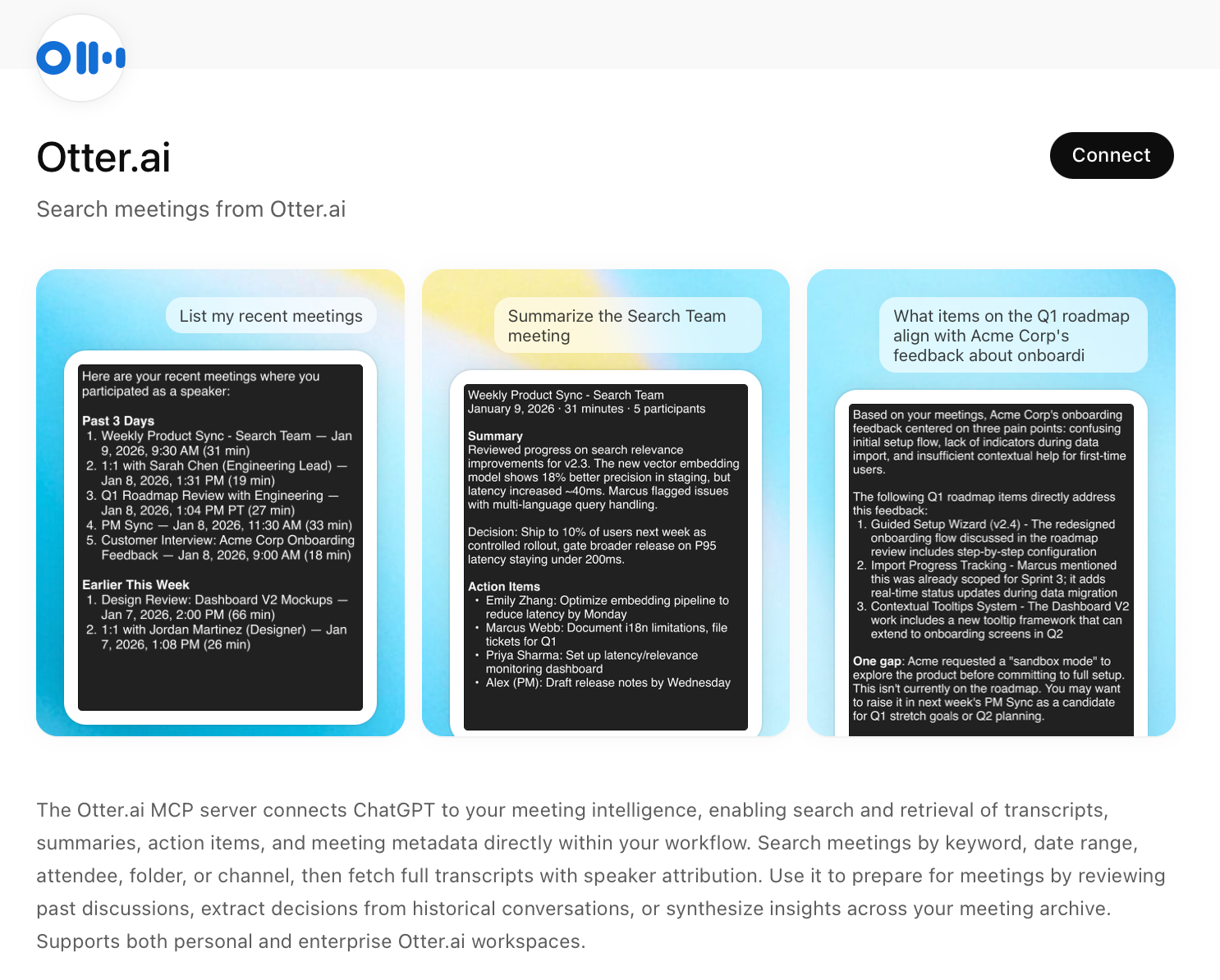
Step 2. Authenticate via OAuth. You'll sign into your Otter account and grant access scope.
Step 3. For enterprise deployments, Otter's admin controls gives IT control over integration scopes, permissions, and access. You decide what ChatGPT can query. Access is logged and auditable.
Step 4. Your teams use ChatGPT exactly as they do today. They now have their Otter meeting history as a live, queryable source.
Related posts