Never Miss the Conversation: Introducing Automatic Recording in Otter Desktop



The hardest part of recording a meeting shouldn't be remembering to press Record.
That's why we're introducing Automatic Recording in the Otter Desktop app.
With Automatic Recording, Otter can detect when a meeting starts, by monitoring when your on device microphone becomes active, then automatically begin capturing the conversation. No extra clicks and no scrambling to remember.
Capture every meeting automatically
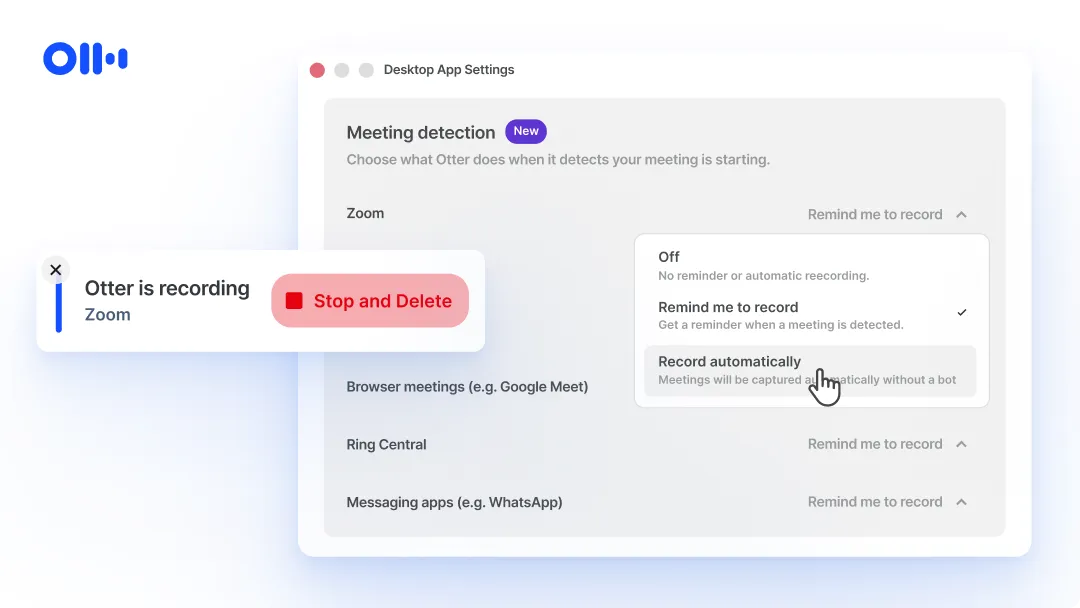
Automatic Recording gives you control over how Otter responds when it detects different types of meetings.
For each meeting type, choose one of three options:
- Off - Otter takes no action.
- Remind me to record (default selected option) - Receive a prompt when a meeting is detected.
- Record automatically - Otter starts recording as soon as the meeting begins.
And you can configure behavior independently for:
- Zoom
- Microsoft Teams
- Google Meet and other browser-based meetings
- Slack Huddles
- RingCentral
- Messaging apps like WhatsApp
So whether you prefer a gentle reminder or completely hands-free capture, you can tailor the experience to fit your workflow.
Easy to set up
Getting started takes just a few clicks:
- Open Desktop App Settings in Otter.
- Navigate to Meeting Detection.
- Choose your preferred behavior for each meeting platform.
- Save your settings and let Otter do the rest.
And, you can mix and match settings. For example, automatically record Zoom meetings while only receiving reminders for Slack Huddles.
Stay focused on the conversation
The best meeting notes are the ones you never have to think about.
Automatic Recording removes one more task from your plate so you can focus on participating in the conversation instead of remembering to document it.
Open the latest version of the Otter Desktop app to configure Automatic Recording today.
Related posts








